 Orion Collect · Android appEarly access
Your forms in the field, online or offline.
Orion Collect is the Android app for OrionForms. Sign in with your OrionGIS account and your forms are on the phone. Collect with GPS, photos and choice lists where there is no signal, and submissions land on your maps and dashboards when you reconnect.
Version 0.1.0-test2 · early-access test build · Android 8.0+ · Apache-2.0
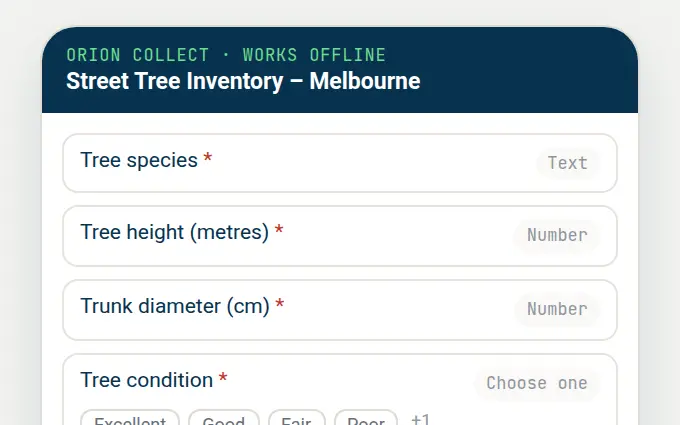
Built for the places surveys actually happen.
Works offline
Download forms once, fill them in without signal, and send when you are back online. Nothing is lost if the battery or network drops.
Sign in with OrionGIS
No server addresses or QR codes: sign in once and every OrionForms project you own appears, with its forms kept in sync.
Rich questions
GPS points, photos, audio, barcodes, dates, choice lists, repeats and skip logic: everything an OrionForms form can ask.
Straight to the map
Submissions go to OrionGIS, where they appear on your project maps and OrionInsights dashboards and can be exported.
From your phone to your first submission.
Install on Android
Early access: not yet on Google Play, so it installs from the download.
- 1On your Android phone, download Orion Collect (44 MB).
- 2Open the file. If Android asks, allow your browser to install unknown apps (Settings → Apps → Special access).
- 3Tap Install, then Open. If an older test build is on the phone and installing fails, uninstall it first.
Sign in and collect
- 1Create a form in OrionForms (OrionAI can draft it from one sentence) and publish it.
- 2In Orion Collect tap Sign in with OrionGIS and enter your OrionGIS username and password. If you sign in with Google or Microsoft, set a password first with Forgot password.
- 3Tap Start new form, fill it in and save it as finalized.
- 4Tap Send finalized forms. The submission appears in OrionGIS, on the map if the form asks for a GPS point.
- Latest version
- 0.1.0-test2 (2026-09-24), early-access test build
- Android
- 8.0 or newer
- Account
- An OrionGIS account with an OrionForms project you own. The free plan includes 2 forms and 250 submissions a month.
- Privacy
- Form data goes only to OrionGIS. Your password is used once to sign in and is not stored on the phone. No ads or third-party analytics.
- SHA-256
- 6bc5a1539ba2ad7e1e71e460c636f76d98d365bedb21245ef3fe7dbac2217a41
- Licence
- Apache-2.0, based on ODK Collect
Take your next survey offline.
Draft the form with OrionAI, put it on your team's phones and watch the results arrive on the map.